Tiny Eden Pot Menu Fix
The quest that traps people is a camera-and-hands problem, not a missing key.
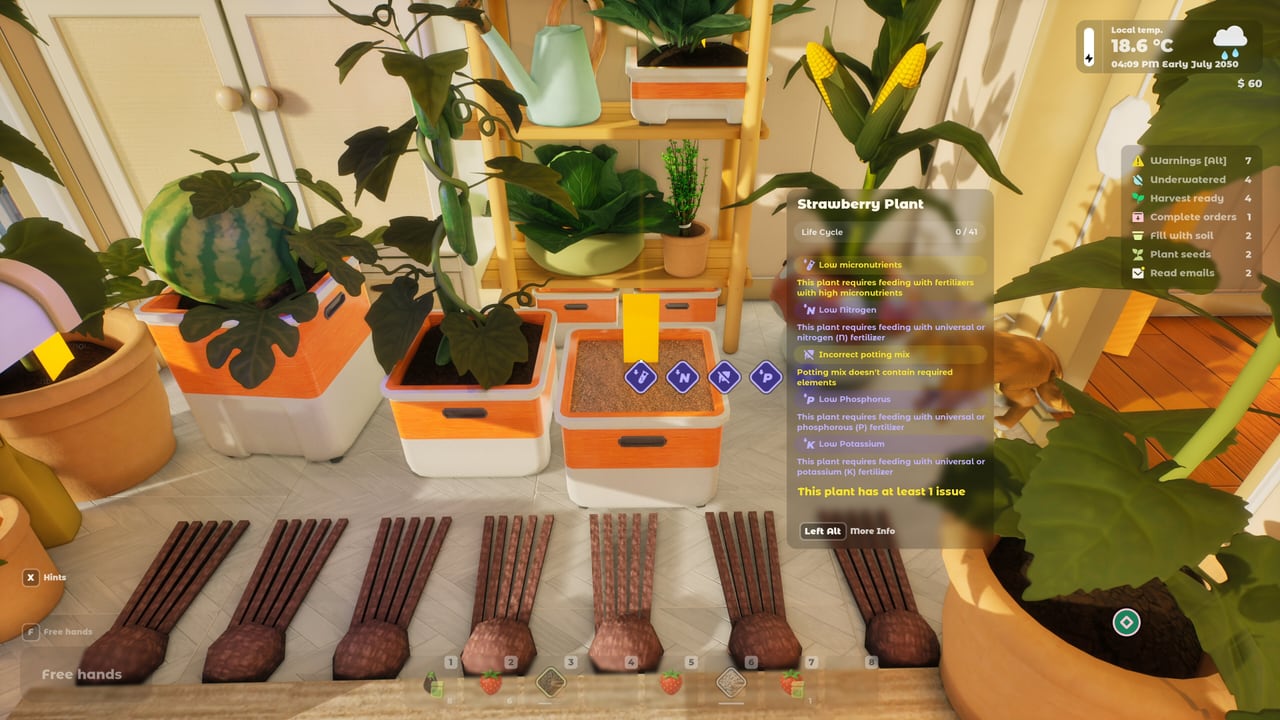
Steam already has players stuck on “Open the Pot Menu.” The menu is not a world-space billboard with a giant P. In demo builds it is tied to looking at a pot you own and using interact, or to a plant/pot tab in inventory. If nothing appears, you are usually holding a watering can, looking at the plant mesh instead of the rim, or running an old save with broken pot names.
This page is the troubleshooting sibling of controls. Once the panel opens, the numbers belong to the soil NPK helper and the pot size chart.
Fast checklist
- Empty your hands. A seed bag or can swallows the interact prompt. Demo HUD often says “Free hands.”
- Look at the rim of the container, not the leaves. Hitboxes sit on the pot.
- Press the interact / left-click used for planting. If that only waters, you still have a tool equipped.
- Open inventory (Q in several demo builds) and look for pot / plant info tabs. Community comments on the improved tutorial put the encyclopedia there.
- Reload the save. Patch 0.4.9.7 fixed pot names displaying wrong after load. Patch notes lists that fix.
- If a quest marker points at a neighbour’s parcel, you are in the wrong hallway. The pot you own is inside your apartment.
What the menu is for
When it works you should see soil composition (compost 0.0/6, sand 0.0/4), water, NPK, and transplant hints. That panel is the whole grow loop. If it says incorrect potting mix, stop fertilising and fix structure. If it says move to a larger volume, do not wait three days — tomatoes despawn in nursery cups. Details in how to grow.
Left Alt in Next Fest footage opened the notification layer (thirst, harvest ready, mail). That is not the pot menu. Alt is the to-do list. The pot menu is the chemistry sheet.
Stove, PC, and other “where is the UI” cousins
Players also miss the recipe face on the stove. Aim at the side panel, not the oven door animation. How to cook covers that. The apartment PC is the shop and orders hub. Parcel boxes outside hold non-furniture buys after patch 0.5.1. If a quest says “open the shop app,” sit at the computer.
Drones and stations have their own interact. Grabbing the station instead of opening it feels like a missing pot menu. See drones.
Bindings reminder
Typical demo set: WASD, mouse look, left click interact, right click grab, Q/E rotate, Q for inventory tabs, Left Alt notifications, Esc settings. Always open Settings in your build. Bajka can remap before 7 September 2026. The controls table is the longer version.
Steam Deck: the demo is not officially supported. If you are on a handheld and cannot click a rim, that is a Deck issue as much as a tutorial issue. System requirements has the two official sentences.
If the quest still will not complete
- Confirm you interacted with your starter pot, not a decorative vase.
- Fill soil to the card before the quest expects a menu. Some steps are ordered: fill, then inspect.
- Verify the demo install. City Garden Harvest folders from 2024 are the same app ID after the rebrand, but an orphan copy can miss tutorial flags.
- Post on Steam discussions with a screenshot of the HUD. Developers have answered pot-menu threads before.
Then go plant something. The menu exists so you can mix compost on purpose, not so you can live in the pause screen. First-hour flow is still Getting Started and the demo guide.
Frequently Asked Questions
Quick answers to the most common Tiny Eden questions.
Where is the Tiny Eden pot menu?
Look at the pot rim with empty hands and interact, or open the plant/pot tab in inventory. It is not a separate keyboard letter in current demos.
Is Left Alt the pot menu?
No. Left Alt opened the notification layer in Next Fest footage. The pot menu is the soil and NPK sheet on the container.
Why do pot names look wrong after loading?
That was a 0.4.9.7 bug. Update the demo. See patch notes.